Feature Upgrade: Build Crew Schedules Instantly with Time Slot Types
Articles
Update
Upgrade
Feature
Managing multi-day festival logistics requires precise, structured timing for crew and volunteers. To eliminate repetitive daily setup, our latest upgrade introduces a quicker, more workflow: Time Slot Types.
Define Once with Colour-Coding
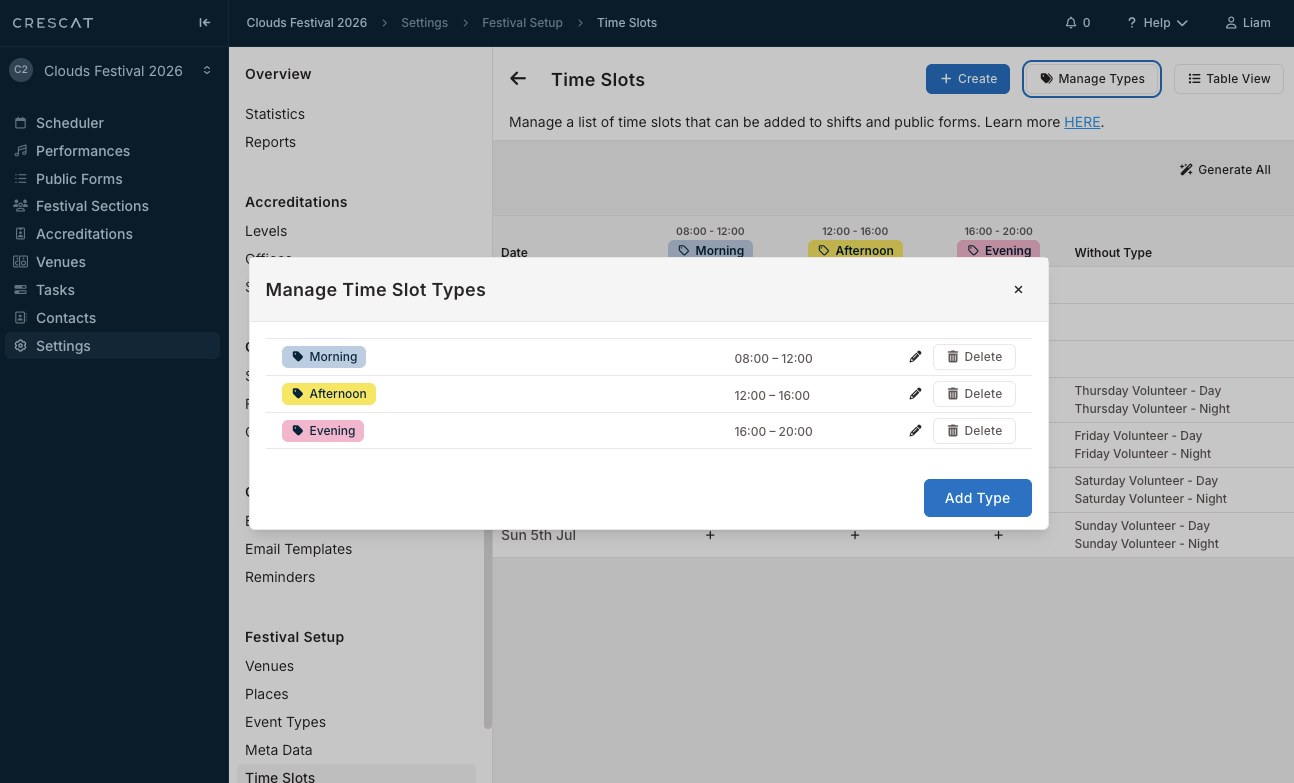
Setting up your master schedule no longer requires manual, day-by-day duplication. Using the Manage Time Slot Types modal, you can map out your production timeline up front:
- Reusable Categories: Create standard blocks tailored to your event’s cadence, such as Morning, Afternoon, Evening or Pre-Show, Show Period, Post-Show
- Precise Parameters: Set the Start time, Duration, and End configurations to lock in your operational windows.
- Visual Mapping: Assign distinct color swatches to each type, turning your schedule into an intuitive visual map.
The Handy One-Click Grid
The festival timeslot grid cleanly cross-references your event dates against your customised types:
- Instant Generation: Click the Generate All magic-wand icon to automatically populate your entire production timeline in one automated sweep.
Smarter Filtering and Scannable Operations
Once generated, Time Slot Types maximise dashboard visibility for your scheduling team:
- Shift Filtering: Effortlessly filter festival shifts by time of day to instantly isolate specific operational windows.
- Clean Data Naming: Timeslots automatically follow standardised real-product formats (like Morning - Friday - 12th), keeping your staffing schedules unified.
The Time Slot Types feature upgrade is available now for Festival users. Log in to your Crescat account today to experience the upgrade.