Give Every Team the Right Access with Roles & Permissions
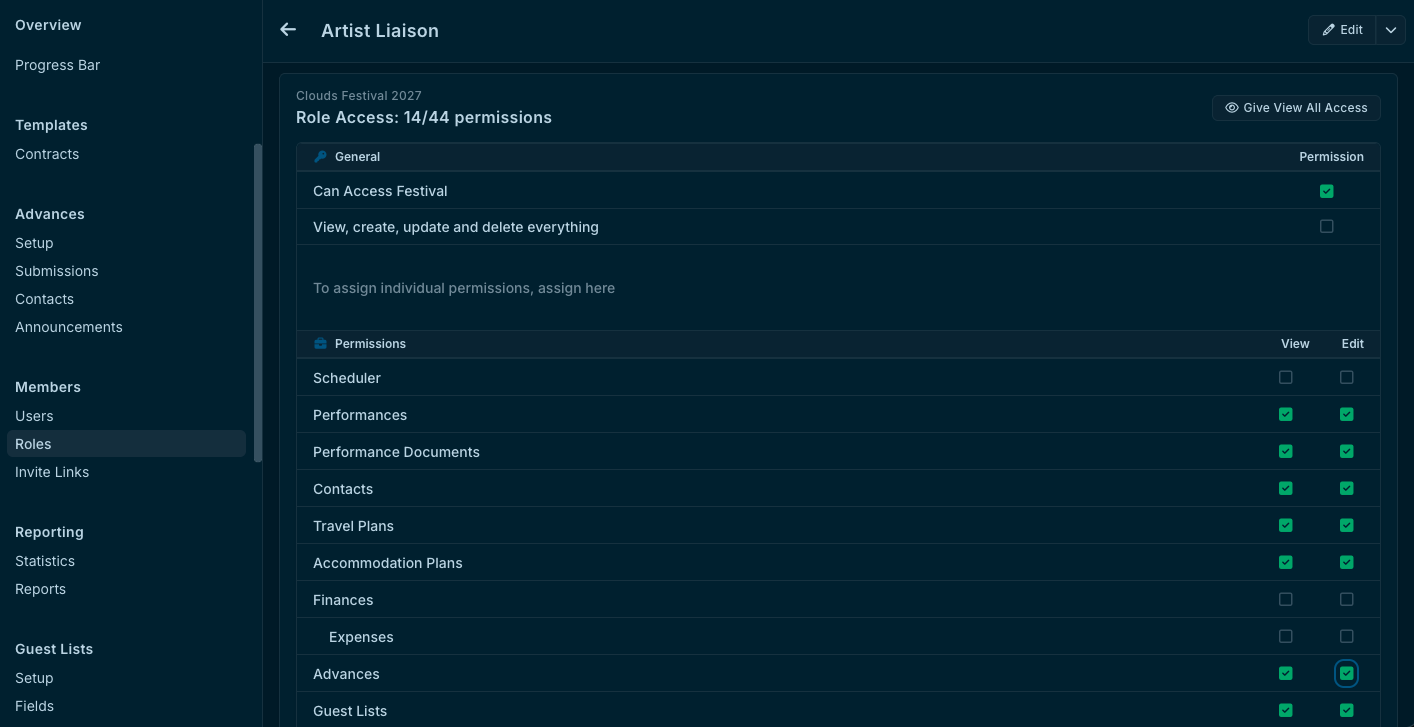
Sharing information is essential in festival production, but over-sharing is a risk, especially around artist bookings and budgets. Roles & Permissions lets you build custom roles, so every team sees what it needs and nothing it doesn't.
Build Custom Roles:
Roles Manager: Create custom roles from a permissions table, with dedicated groups for each area of your festival.
View or Edit: For each permission group, choose whether a role can only view the data or edit it too.
Advance Permissions: Give a role access to advance forms and logistics only, without the rest of the performance page.
Expense Permissions: Let a role log and manage expenses in Finances while artist fees, deposits and budget totals stay hidden.
Roles for Real Festival Teams:
Production Coordinator: View Advances, so they know each artist's hospitality needs without seeing financial documents.
Finance Lead: View and Edit Expenses, to manage the daily ledger without access to travel itineraries.
Artist Relations: View and Edit Advances, to finalise details directly with the talent.
More Ways to Control Access:
Read or Write on Every Event: Set Read or Write access for each person involved in an event, from the People tab in Members.
Sensitive Form Data: Restricted fields in Public Forms are visible only to members with full management access.
Section Access: Use Festival Section Access to give specific teams, such as Production or Backstage Catering, view access to the stages that matter to them in Stage View.
Reuse Your Roles: Import roles from a previous festival with Festival Rollover when you set up the next one.
Benefits:
Share Without Over-Sharing: Sensitive figures stay with the people who need them.
Delegate with Confidence: Hand work to your teams without opening up everything.
Set Up Once: Build a role once and assign it to everyone who needs it.
Read more in Expense & Advance Permissions for Festivals, or see our Roles Manager help article.